

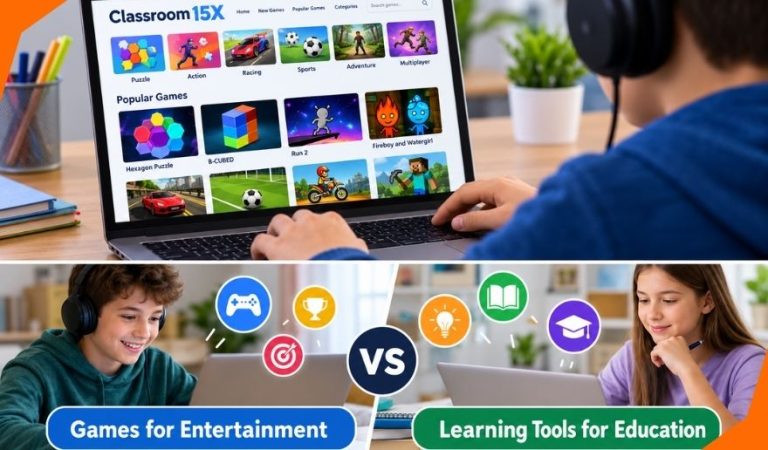
Classroom 15X is mainly associated with a website that collects free browser-based games. Visitors can browse puzzle, racing, arcade, sports, and other titles and open individual game pages without installing a conventional game application. Despite its name, the site is primarily a gaming destination rather than a school learning platform.
That distinction matters to students looking for entertainment, parents checking what children are using, and teachers choosing digital activities. A game may be enjoyable or mentally demanding without directly teaching a school subject.
This guide explains what the website offers, how its games work, and where educational benefits might fit. It also covers practical access, safety, common problems, and more purpose-built learning resources.
What Is Classroom 15X?
Classroom 15X commonly refers to an online game catalog using that name. Its homepage groups games into categories and collections such as new games, popular choices, and random selections. Players choose a title and move to a separate page containing the game and, where provided, its description and controls.
The site promotes free, quick-play entertainment, including games described as suitable for school breaks. That is a statement about its intended setting, not evidence that a school has approved it or that its games meet teaching standards.
Other sites use similar names, so a search result with “Classroom 15X” in its title may lead to a different catalog. Features, advertisements, and policies should be assessed for the particular site being opened.
Why Is Classroom 15X Sometimes Called an Educational Model?
Some articles use the name to describe a technology-rich classroom with personalized lessons, flexible spaces, interactive activities, and progress tracking. An article published under the gaming site’s own name also describes an ambition to improve education by “15x.”
Those are proposals and promotional descriptions, not demonstrated features of its game catalog. No independently established fifteenfold learning improvement or standardized instructional method is evident from the site’s material. Its visible gaming pages do not establish that it supplies teacher dashboards, curriculum plans, or academic assessment.
The confusion comes partly from the word “classroom.” Readers should distinguish a concept about teaching methods from an actual tool they can open and use. The practical question is what a particular game teaches, not whether the website has an education-related name.
How Does Classroom 15X Work?
The website acts as a directory. Its category and game-list pages help visitors find titles, while individual pages provide a place to launch or interact with a game. Some listings include written instructions and tags describing the type of play.
Browser games run through technologies supported by a web browser, although their individual requirements can differ. A player might use keyboard keys to move a character, a mouse to solve a puzzle, or touch controls on a supported phone. Game performance depends on the title, the device, and the internet connection.
For casual play, the site advertises access without downloads. It also displays member sign-in options for activities such as commenting, so browsing games and using account-related features should not be confused.
Mast Read: Gooooooooooooooogle: A Guide to Google’s Stretched Spelling
Main Features of Classroom 15X
A Browsable Game Library
Categories such as puzzle, sports, driving, adventure, simulation, and multiplayer make it easier to find a preferred style. The catalog is useful for discovery, although game quality and suitability are not uniform.
Individual Game Pages and Instructions
Some game pages present a description, controls, category tags, and related selections. This can help newcomers understand a game’s objective before playing, but details may vary between titles.
No Conventional Installation for Many Games
The website presents browser play as an alternative to downloading game software. That reduces setup for supported games, but opening a webpage still uses device resources and may load content from other services.
Options for Phones and Shared Play
The site includes a mobile-friendly category and two-player games. Availability does not guarantee that every game supports touch screens, smaller displays, or two players on one device. Check the individual game’s controls first.
What Types of Games Are Available?
The catalog contains several kinds of entertainment. Puzzle titles such as B-CUBED and Hexagon Puzzle emphasize patterns, planning, and trial and error. Racing and platform games, including Run 2 and driving titles, generally focus on timing and control.
Sports games, idle or clicker games, adventure titles, and two-player activities offer different experiences. The listed Fireboy and Watergirl games, for example, use coordinated movement and obstacle-solving, while Spider Solitaire follows familiar card-game rules.
Not every listing is aimed at young children. The presence of shooting, horror, and combat categories means adults should consider a game’s content individually instead of relying on the site’s broad school-friendly description. Titles and availability can also change.
Browser Games vs. Educational Learning Tools
Different Primary Goals
Entertainment games are normally designed to keep play enjoyable through challenges, progression, and rewards. Educational tools begin with a learning purpose: understanding fractions, testing a science concept, practicing vocabulary, or demonstrating a skill.
Teaching, Feedback, and Assessment
A structured learning resource often provides explanations, age-appropriate tasks, feedback about mistakes, or ways to check understanding. A game can have points and levels without explaining why an answer is correct or showing whether a student understands the underlying concept.
Engagement Is Not the Same as Learning
A student who finishes a difficult puzzle may have practiced strategies within that game. It does not automatically follow that their mathematics grades, reading skills, or general concentration will improve. Meaningful educational claims need outcomes measured outside the game, ideally compared with suitable alternatives.
This distinction does not make recreational play worthless. It simply prevents enjoyment, fast responses, or a high score from being treated as proof of academic progress.
Can These Games Support Useful Skills?
Certain games create opportunities to practice planning, visual tracking, cooperation, persistence, or recognizing patterns. A player who repeatedly adjusts a route through a puzzle, for instance, may learn to test a strategy and revise it after failure.
The important limitation is transfer: whether that practice improves performance on a different task. Becoming better at a racing game mainly demonstrates improvement at that game. Claims about broader attention, intelligence, or classroom achievement require more evidence than the game’s design suggests.
For a school activity, ask students to describe their choices and connect them to a lesson. Explaining why a solution worked is often more educationally informative than the score alone. Adults should still choose age-appropriate games and avoid assuming every title offers such opportunities.
How Teachers Can Use Games Purposefully
A teacher considering a game should start with one specific objective. If the lesson is about planning, select an activity that actually requires comparing possible routes. If the lesson is about fractions, a general arcade game is unlikely to be the strongest choice.
Next, try the game on the devices students will use. Review advertisements, controls, reading demands, content, accessibility, and the time required to reach a meaningful challenge. Check school policy before opening a general entertainment site on classroom networks.
A short activity can follow a simple sequence: explain the goal, allow a fixed period of play, then ask students to discuss a decision or solve a related question without the game. This final check shows whether the activity contributed to the lesson rather than merely occupying time.
For repeated assessment or curriculum coverage, a dedicated teaching resource is usually more suitable than a changing collection of recreational games.
Devices, Accounts, and Access Requirements
Classroom 15X is presented as a browser-based service for computers and some mobile devices. A reasonably current browser, working internet connection, and suitable input controls are sensible starting requirements. A Chromebook may run compatible games, but school-managed restrictions can prevent access.
The main website advertises free play without conventional downloads. Game browsing does not appear to require an account, although member-only functions such as comments may require signing in. Avoid entering personal details simply to reach a game, especially on unfamiliar look-alike sites.
Touch support, loading speed, sound, and full-screen behavior vary by title. If a game depends on keyboard commands, a phone or tablet may be inconvenient even when its page opens successfully.
Safety, Privacy, and School Rules
Consider the Game and Its Surroundings
The website describes its content as school-friendly, but that is not an independent content rating. Its range includes games and categories that may be unsuitable for some ages. Parents and educators should look at the actual game, not just its label.
Understand Advertising and Data Collection
The site’s published privacy policy discusses cookies, usage logs, advertising partners, and information supplied through contact or account features. This means playing without registering should not be mistaken for browsing without any data collection. External advertisers and linked services may have separate practices.
Avoid sharing a child’s personal details, review the site’s privacy notice, and use browser privacy controls where appropriate. A secure connection, by itself, cannot establish that every advertisement, game, or external destination is trustworthy.
Follow School Policies and Respect Rights
“Unblocked” is a marketing description, not a guarantee that access is permitted. School networks may restrict entertainment sites for instructional, security, or bandwidth reasons; students should not try to evade those controls.
Availability on a game directory also does not independently prove that every hosted title has appropriate distribution permission. Downloading, copying, or republishing game materials raises different rights questions from ordinary browser play.
Common Classroom 15X Problems and Fixes
A Game Will Not Load
A temporary connection problem, blocked browser component, or unavailable game resource could be responsible. Reload the page once, try another current browser, and check whether other websites work. Do not install an unfamiliar extension offered as a supposed fix.
The Game Freezes or Runs Slowly
Heavy animations, many open tabs, or limited device memory can reduce performance. Close unnecessary tabs, restart the browser, and try a less demanding title. On shared computers, ask before changing device settings.
The Controls Do Not Respond
Some games rely on keyboard shortcuts or require clicking the game area before controls activate. Read the instructions on the individual page. On phones, select a game specifically designed for touch input.
The Website Is Restricted at School
The network may intentionally block gaming websites. Contact a teacher or school technology administrator if a game has been assigned for learning. For casual entertainment, use an approved option during permitted free time rather than bypassing restrictions.
Educational Alternatives Worth Considering
PhET Interactive Simulations
PhET offers free, research-informed interactive simulations in science and mathematics. Students can adjust variables and observe consequences in activities covering topics such as motion, circuits, and mathematical relationships. The simulations are built to support exploration, though teachers still need to frame useful questions around them.
Scratch
Scratch is a free creative coding environment in which learners build interactive stories, animations, and games using visual programming blocks. Unlike simply playing a finished game, making a project requires decisions about instructions, testing, and debugging. It is especially useful for introductory programming and project-based activities.
Kahoot!
Kahoot! lets teachers create or select quizzes and run interactive review sessions. A free teacher offering exists, while higher participant limits and some question types or reporting features require paid plans. It is suited to checking knowledge and discussing answers rather than providing an open-ended entertainment catalog.
These resources serve different purposes. Choose PhET for exploring concepts, Scratch for creating with code, and Kahoot! for question-based practice. None replaces effective lesson planning or teacher feedback.
Advantages and Limitations of Classroom 15X
Advantages
The main attractions are convenience, varied game styles, and little setup for many browser-compatible titles. Puzzles and cooperative games can offer a pleasant break and sometimes provide a starting point for discussion or reflection.
Limitations
The website is not organized around a verified curriculum, and its games do not collectively provide dependable assessment of learning. Suitability differs between titles; advertisements, privacy considerations, device compatibility, and local network restrictions also affect the experience.
Its strengths therefore relate mainly to casual play, not replacing dedicated teaching software or structured instruction.
Final Thoughts
Classroom 15X is most useful to understand as a browser gaming catalog. Some games may be engaging or provide opportunities to practice particular strategies, but the site itself should not be mistaken for a complete learning platform or a proven educational model.
Students can approach it as optional entertainment where permitted. Parents can review game content and privacy practices, while teachers should choose activities for defined learning objectives and check understanding afterward.
When a lesson requires subject-specific practice, progress checks, or creative projects, resources designed for those purposes are the more reliable starting point.
FAQs
What Is Classroom 15X Mainly Used For?
It is mainly used to browse and play online games. The site brings together different genres and lets visitors open individual game pages, typically without installing a separate game application.
Is Classroom 15X a Gaming Website or an Educational Platform?
Its main visible service is a gaming website. Although some pages discuss a proposed modern classroom model, the game catalog should not be treated as a verified curriculum, teaching system, or student assessment platform.
Are All Classroom 15X Games Suitable for Students?
No single suitability judgment applies to every title. The catalog includes different genres, including potentially mature themes, so adults should review individual games for age appropriateness, advertisements, and school rules.
Can Puzzle Games Improve Academic Learning?
Puzzle games can provide opportunities to practice strategies and pattern recognition. Whether those gains carry over to school subjects is a separate question that needs evidence and, ideally, instruction connecting the game to a learning goal.
Does Classroom 15X Track Students’ Academic Progress?
Its game catalog does not demonstrate a dedicated academic progress-tracking system. Individual games may show levels or scores, but these are not the same as teacher-facing records of curriculum achievement or assessed understanding.
Can Students Use Classroom 15X on Chromebooks?
Some browser-based games may work on Chromebooks when the browser and controls are compatible. School administrators can still restrict the website, and a game that opens successfully may not perform well on every device.
Why Might Classroom 15X Be Blocked at School?
Schools may restrict general gaming sites to reduce distractions, protect devices, or manage network use. A site calling itself “unblocked” does not override local rules; ask school staff about approved learning or break-time options.
What Educational Websites Can Teachers Choose Instead?
PhET supports science and mathematics exploration, Scratch helps students create programs and interactive projects, and Kahoot! supports quizzes and knowledge checks. The right choice depends on the lesson objective, student age, available devices, and required features.
For More News and Daily Updates Visit: Gigly Magazine
