

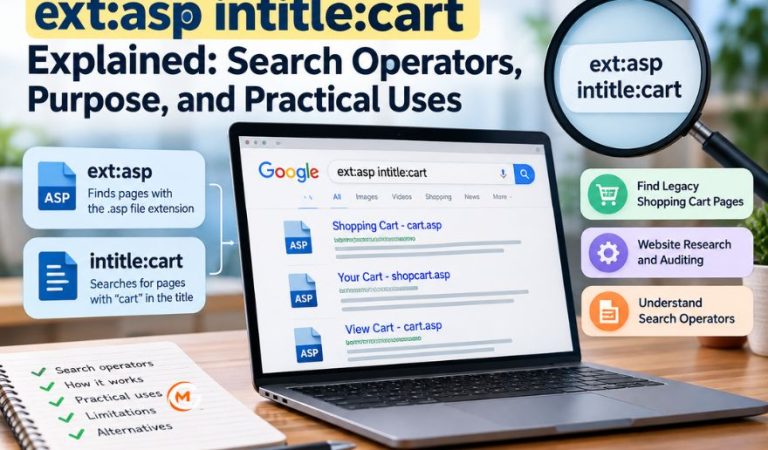
The expression ext:asp intitle:cart is an advanced web search query intended to find pages associated with the .asp extension and the word “cart” in their titles.
Website owners, developers, and researchers might encounter this expression while reviewing older shopping systems or checking which pages appear in a search engine’s index.
This guide explains the individual operators, how results are produced, practical ways to use the query, and more reliable tools for investigating websites you manage.
What Does ext:asp intitle:cart Mean?
ext:asp intitle:cart is a search instruction, not a website, application, or program. Its intended meaning is straightforward: look for web pages associated with the ASP file extension whose titles contain “cart.” The expression is often discussed in connection with older online shopping applications, although matching pages can serve many different purposes.
The first part refers to a file extension commonly associated with Classic Active Server Pages. The second part asks the search engine to focus on the page title.
There is an important qualification. Google officially documents filetype: for filtering by file type, but not ext: in its current operator documentation. Some third-party guides describe ext: as an alias. Because that behavior is not an officially documented guarantee, filetype:asp intitle:cart is a better starting point on Google.
Mast Read: quikconsole com Explained: Features, Content Categories, and Website Overview
Understanding the Two Search Operators
What Does ext Refer To?
A file extension is the suffix that often appears at the end of a file name, such as .pdf, .html, or .asp. In this expression, ext:asp is intended to favor results associated with .asp files.
Google’s documented filetype: operator identifies results by a file extension or an HTTP content-type header. Therefore, even the documented operator should not be treated as a complete inventory of ASP-based pages.
What Does intitle Mean?
intitle:cart asks the search engine to match “cart” in a page title rather than anywhere in the document. Titles help describe pages in results, but an indexed title may not exactly match the wording displayed on a live website. The condition also does not establish that the page contains a working shopping cart.
The absence of a space after each colon matters. Writing intitle: cart can change how a search engine interprets the expression, so keep the operator and its value together.
How the Combined Search Works
A search engine first discovers and processes pages through its normal crawling and indexing systems. When someone enters a query with operators, the engine uses its stored information to select and rank potentially matching results.
Combining a file-type condition with a title condition is intended to restrict two different characteristics of a result. A page might have an .asp address but an unrelated title. Another page might have “cart” in its title while using a modern address without any file extension. Either can fall outside the intended match.
Search engines also have differences in their supported syntax, ranking methods, and indexes. Think of the query as a discovery aid that produces leads, not a comprehensive report or a reliable count of active carts.
Why ASP Pages Appear in Shopping Cart Searches
Classic ASP, short for Active Server Pages, is a Microsoft server-side scripting technology used to create dynamic websites. The server executes the scripts and sends generated content, commonly HTML, to the visitor’s browser.
Older online stores could use ASP scripts to display products, update baskets, manage sessions, and process order-related requests. A page with a name such as cart.asp might have represented one part of that workflow.
A .asp address suggests a possible connection with Classic ASP, but it cannot by itself confirm the current server software, the age of the application, or its security. Some websites preserve old-looking addresses after changing technologies. ASP.NET is a different technology, often associated with .aspx pages.
What You Need Before Starting
You only need a web browser and access to a search engine to enter the expression. No software installation, paid account, or registration is required for ordinary public searches.
A clear purpose makes the results more useful. A site owner might want to check whether old basket pages remain discoverable after a redesign. For questions about a specific website, access to its administrative tools provides stronger evidence than public search results alone.
How to Use the Query Step by Step
Start with a small, controlled search rather than assuming that the first results are complete or current. For website maintenance, limit the scope to a domain you own or have permission to assess.
- Open Google Search. Enter
ext:asp intitle:cartto understand the original expression. - Try the documented form. Search for
filetype:asp intitle:cartand compare the results. - Narrow the domain. Add
site:YOUR_DOMAINwhen researching a website you manage. Replace the placeholder with your actual domain, with no space after the colon. - Read the result details. Note the displayed title, address structure, and snippet.
- Check relevant pages appropriately. For your own site, use your administration tools, deployment records, or a safe browser check to establish what currently exists.
- Record what needs attention. Keep a list of potentially outdated routes, unexpected indexed pages, and results that require investigation by the responsible team.
If the search engine displays a corrected version of your query, inspect that change before interpreting the results. A list of apparently relevant pages is not confirmation that both requested conditions were strictly applied.
How to Interpret and Verify Results
Start by separating what the search result shows from what you still need to establish. The result title is an indicator of a page’s subject. The address may reveal an .asp suffix, a redirect, or a descriptive path. The snippet may be outdated.
For a website you control, compare each candidate with the current routing configuration and page inventory. Ask whether it returns the expected page, redirects to a newer route, or no longer exists. Use an approved administrative or diagnostic method to check its HTTP response and indexing status rather than relying only on the text shown in a result.
Also consider the title’s meaning. “Cart” might refer to a shopping basket, a transportation cart, or unrelated content. Conversely, a functioning checkout may use “basket,” “bag,” or “checkout” instead.
Practical Uses for Website Owners and Researchers
Reviewing Legacy Shopping Cart Pages
A store that previously used Classic ASP may want to locate old shopping routes still visible in search. A focused query can help identify candidates for redirect checks, content cleanup, or archival decisions. It should be compared with the site’s actual route list so missing results are not overlooked.
Checking Page Titles and Indexing
Search results may reveal titles that are confusing, outdated, or inconsistent with a new store design. Site owners can then inspect the underlying pages and determine whether their titles, canonical settings, and indexing instructions reflect the intended experience.
Supporting Website Migrations
During migration from a legacy store, older basket pages may require redirects or intentional removal from indexing. The query can provide supplementary examples for a migration checklist. Server logs, old sitemaps, analytics records, and the application’s route definitions are more dependable for finding the full set of affected addresses.
Researching Historical Website Structure
Developers may also use the expression to understand how earlier sites labeled shopping-related pages. This is useful background for documenting legacy systems or planning maintenance. It cannot reveal private architecture or code.
Advantages and Disadvantages of This Approach
Advantages
The main advantage is convenience: two short conditions can reduce unrelated results compared with a broad search for shopping carts. The expression may help users recognize old-style page names and locate a few examples without installing specialized software. Adding a site filter can make research more focused.
It is also a low-effort first check. Someone preparing an inventory can use it to form questions for the development team before moving to authoritative internal records.
Disadvantages
The disadvantages are significant. ext: lacks current official Google documentation, while results using filetype: are still limited by search indexing. Pages without matching titles or extensions are easy to miss, and snippets can become outdated after changes to a website.
Most importantly, the expression cannot establish whether a cart works, is secure, accepts payments, or stores personal information. It is not a substitute for testing a site’s functionality or reviewing its security controls.
Mast Read: Metronidasool: How Long Does It Take to Treat Infections?
Common Problems and How to Fix Them
No Results Appear
An empty result page might mean no matching pages were indexed, or that the engine did not interpret the expression as expected. Retry with filetype:asp, then add intitle:cart separately to see which condition narrows the results. If you manage the site, consult its indexing tools before concluding that a page is absent.
Unrelated Pages Appear
A page title containing “cart” does not always refer to e-commerce. Adding a domain restriction can improve relevance for a site-specific investigation.
Different Search Engines Show Different Pages
Search providers do not necessarily recognize the same operators or hold the same indexed pages. Verify that the specific engine documents each operator before comparing results.
A Result Leads to an Error or Redirect
The indexed address might have been removed, renamed, or redirected since it was crawled. For your own site, check the response through the hosting environment and review the planned redirect destination.
Better Alternatives for Different Research Needs
Google’s filetype: and site: Operators
For a public, focused search, filetype:asp intitle:cart uses Google’s documented file-type filter in place of ext:. The site: operator can restrict the scope to a domain or path. Neither one promises an exhaustive list, but both are useful for an initial check without a separate account.
Google Search Console
For a verified website property, Search Console offers page-indexing information and a URL Inspection tool. It can help determine whether Google indexed a particular page and identify some crawling or indexing problems. It requires access to the relevant property, making it more suitable for site owners than casual researchers.
Bing Webmaster Tools
Bing Webmaster Tools provides URL inspection and site-exploration features for websites added to an account. It can show how Bing handles selected pages and highlight certain crawling or indexing issues.
Server Logs and Application Records
For an internal website audit, server logs, application route definitions, and archived sitemaps often answer questions that a public search cannot. Logs can show requests made to old cart routes, while application records help confirm which routes are currently supported.
Responsible Use and Privacy Considerations
Finding a publicly indexed address does not authorize attempts to access another organization’s accounts, checkout sessions, or customer records. Keep technical testing within systems you own or have explicit permission to assess. Researching search results is different from running a vulnerability assessment.
An ASP extension is also not evidence of a security flaw. Actual security depends on configuration, application code, maintenance, authentication, and many other factors. If a result appears to expose sensitive information, avoid collecting or sharing it and use the website operator’s appropriate reporting channel.
For stores you operate, review whether cart and checkout pages expose any customer-specific data through indexing or caching. Address confirmed problems through access controls and appropriate indexing directives; merely hiding a page from search results does not protect information stored on the server.
Final Thoughts
ext:asp intitle:cart is best understood as a narrow web search expression associated with ASP-style pages and cart-related titles. It can help start an investigation into older website routes, but its unsupported ext: syntax and dependence on search indexes limit what the results can establish.
For a more dependable search, begin with Google’s documented filetype: operator and add a domain restriction when appropriate. If you manage the website, verify significant findings using Search Console, application records, and approved diagnostic tools.
The useful outcome is not a long list of pages. It is a short, verified list of issues or maintenance tasks that can be addressed with confidence.
FAQs
What does ext intitle mean?
It is intended to find indexed web pages associated with .asp files and titles containing “cart.” It is a search expression rather than a standalone tool, and its results depend on how the search engine interprets the operators.
Is ext an officially supported Google operator?
Google currently documents filetype: for file-type filtering but not ext: in its search-operator guidance. Because ext: is not a documented guarantee, use filetype:asp when you want a more dependable Google query.
What does intitle search for?
It asks a search engine to match the word “cart” in a page’s title. That can narrow results toward relevant pages, but it cannot prove the page contains a functioning shopping basket or checkout process.
Does this expression identify vulnerable websites?
No. An .asp extension or a cart-related title does not establish any security weakness. Evaluating security requires authorized testing, technical context, and evidence about how the application is configured and maintained.
Why might the query return no results?
The search engine might have no indexed pages that match, or it may not recognize the undocumented portion consistently. Try filetype:asp on its own and then add the title condition to isolate the issue.
Can I search only pages from my own website?
Yes. Add the site: operator with your domain to narrow the results. Remember that this still does not list every indexed page, so use your site inventory or webmaster tools for a fuller review.
Are ext and filetype exactly the same?
Some independent search guides describe ext: as an alias for filetype:, but Google does not officially document that equivalence. You should not assume that both forms will always receive identical treatment or return matching results.
What should website owners use for more reliable checks?
Use Google Search Console or Bing Webmaster Tools to inspect indexing, alongside server logs and application records to confirm current routes. These first-party sources provide stronger evidence than an isolated public search result.
For More News and Daily Updates Visit: Gigly Magazine
