

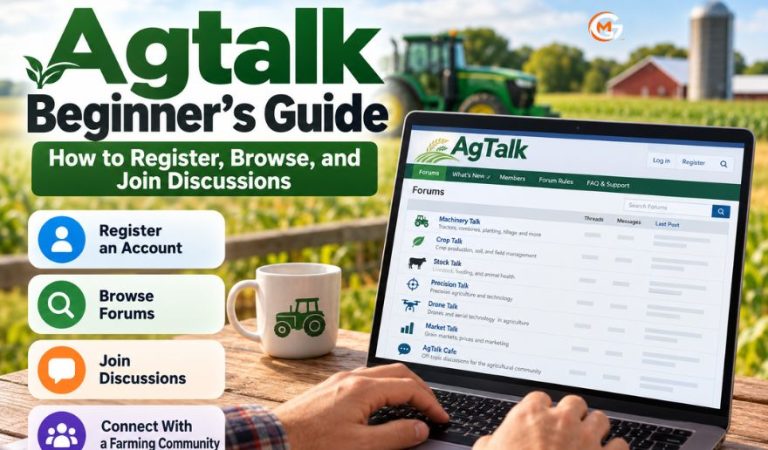
Agtalk, commonly styled AgTalk, is an online discussion community focused on agriculture. Farmers, equipment owners, and other readers use its forums to exchange practical experiences, ask questions, and discuss problems ranging from machinery repairs to crop production and livestock management.
Its value comes from conversations between people who have encountered similar situations. A discussion about a planter setting, for example, may offer several approaches rather than one standard instruction.
This guide explains how to read the forums, register an account, search past conversations, and contribute useful posts. It also covers account problems, posting rules, and other farming communities worth considering.
What Is Agtalk and How Does It Work?
Agtalk is a traditional web-based message board, not an agricultural management app or a professional advice service. Topics are organized into separate forums, and each conversation begins with a thread: an opening message followed by replies from other participants.
Visitors can read public threads without registering. Members who want to ask questions or respond must register and log in. The site displays thread subjects, authors, reply counts, and recent activity to help readers decide which discussions to open.
Although many examples involve North American farming, readers elsewhere can learn from discussions about equipment, soil management, and technology. Local differences in climate, regulations, product names, and machinery specifications still matter when applying advice.
Understanding the Main Agtalk Discussion Forums
The homepage presents forums by subject rather than putting all questions in one feed. Choosing the most relevant board helps your question reach readers with suitable experience.
Machinery Talk, Crop Talk, and Stock Talk
Machinery Talk covers operating equipment, repairs, maintenance, and troubleshooting. Crop Talk focuses on planting, soil preparation, crop management, and field conditions. Stock Talk is for livestock-related questions and experiences.
Precision Talk, Drone Talk, and Market Talk
Precision Talk addresses precision-agriculture equipment and operation, including positioning and control systems. Drone Talk deals with aerial and unmanned technologies in production agriculture. Market Talk hosts discussions about agricultural marketing and market conditions; opinions there should not be confused with financial advice.
Other boards include Computer Talk, AgTalk Cafe, Kitchen Table, and a forum for locating parts, salvage yards, or equipment. The Test Forum provides space to practice posting, while FAQ & Support addresses problems with the website itself.
Mast Read: r squaredcircle Explained: Features, Discussions, and Community Guidelines for Wrestling Fans
How to Register for an Agtalk Account
Reading discussions is possible as a guest, but you need an account to post. The registration process takes place in a browser, so start with the AgTalk forum itself rather than a similarly named website. Ordinary registration does not require choosing a paid plan.
Before You Begin
Have a username and a strong, unique password ready. The site’s published registration instructions identify those two items as required and describe other profile information as optional. Read the terms carefully, particularly because messages on this public forum should not be treated as private.
Step-by-Step Registration
-
Open the forum homepage and find the guest status line near the top.
-
Select register to open the account creation page.
-
Read the terms of usage, select the agreement checkbox if you accept them, and submit that step.
-
Enter your chosen username and password along with any optional information you wish to provide.
-
Submit the registration form, return to the forum, and select logon.
A newly registered account may be pending authorization, as the site’s login page explains. If login is unavailable immediately, do not keep creating duplicate accounts. Check the on-screen notice and seek administrator help if the problem continues.
Logging In and Setting Up Your Profile
The login screen asks for your username, password, and a verification code. This code is a randomly generated six-digit number displayed as an image; it is not an email confirmation code. Enter the digits visible for that particular login attempt.
Images must be enabled to see the code, and the browser needs to accept session cookies for it to work. The login page also offers a remembered-login option. On a shared computer, avoid keeping your account signed in.
After logging in, use the Control Panel to manage available settings, such as your password, signature, and message editor. A signature appears with your posts, so keep it short and useful. A general region or farming context may help readers interpret your advice, but you do not need to publish a precise location or personal contact details.
How to Browse Threads and Follow Conversations
Select a forum from the main list to see its discussions. Each thread listing gives you a subject, author, number of replies, and last-post information. These details help distinguish an active conversation from an old question that may no longer reflect current equipment or practices.
Open a subject to read the original message and the responses. The forum offers Flat, Threaded, and Nested message formats. Flat view is convenient for reading messages in sequence; the other formats make relationships between replies easier to follow.
Announcements or frozen threads often appear near the top. They may contain rules or important notices, even when ordinary replies are closed. You can return to the forums list or switch boards when a conversation moves beyond your interests.
For a first visit, read a few complete threads before posting. Notice which details experienced members include when asking about equipment failures, seed placement, or unexpected field results.
Searching Agtalk for Existing Answers
Use Search Forums rather than scrolling through many pages when you have a specific question. The forum’s search area allows searches using terms, author names, subjects, selected forums, and posting dates. Access to the search function requires a registered account.
Begin with a specific phrase, such as a tractor model and a fault description, rather than a broad question like “tractor problem.” If results are thin, remove one term or widen the date range. Searching within Machinery Talk can reduce unrelated results when investigating repairs.
Read the date and full context before copying a solution. A useful answer for an older display, pesticide label, or firmware version may be unsuitable now. You can also use a general web search to locate publicly indexed threads without relying on the forum’s account-restricted search page.
Starting New Threads and Replying to Members
When you cannot find an adequate answer, choose the forum that best fits your topic and use its new-post control while logged in. Write a subject that states the issue clearly. “Planter row-unit bouncing on hard ground” is more informative than “Need help.”
Describe the equipment or situation, what you have already checked, and what result you want. For field questions, relevant details might include crop stage, soil conditions, irrigation, recent weather, or the product label. Avoid exposing farm records, serial numbers, or identifying information that is not needed.
To join an existing conversation, select the appropriate reply option. Respond to the specific point being discussed, and make clear whether your information comes from direct experience, a manual, or an informed suggestion. A respectful follow-up explaining what eventually worked can be especially helpful to future readers.
If a thread concerns a different model or region, say so before offering comparisons. Posting several copies of the same question across forums is less useful than choosing one appropriate place and responding to requests for clarification.
Five Useful Features for Regular Users
Photos and File Attachments
Images can make equipment damage, crop symptoms, and wiring questions easier to understand. The site documents an attachment workflow in which users add a file while composing a message. Follow the upload prompts and current size limits shown on the screen, and remove sensitive details from images first.
Text and HTML Editor
The Control Panel offers basic text and an HTML editor. Basic text keeps formatting simple, while the HTML option provides controls for styling text and inserting content. The site’s older help instructions describe these functions; exact buttons may differ with the current browser or page layout.
Signatures and Mapdots
A signature can show a short description beneath your contributions. A mapdot is a small image used to indicate a general location. Both are optional; broad regional information is usually enough to give farming advice useful context.
Display Skins and Thread Views
The Skins control changes the forum’s appearance, while message format choices affect how a conversation is displayed. These options can make long discussions more comfortable to read without changing their content.
Test Forum and Support Board
Use the Test Forum to practice attachments or formatting rather than cluttering a topic board. The FAQ & Support forum is intended for questions about using the website, including account or posting difficulties.
Posting Rules, Privacy, and Practical Cautions
AgTalk’s published posting policy emphasizes civil discussion and prohibits harassment, disruptive behavior, inappropriate material, and misuse of copyrighted content. The main discussion forums are not intended for aggressive advertising or repeated sales pitches. Check current rules before posting anything commercial or using the separate classifieds area.
The registration terms state that submitted information should not be considered confidential. Avoid sharing passwords, contact details, private correspondence, client information, or documents revealing sensitive farm operations. Review photographs for faces, addresses, location information, and identifying labels before uploading them.
Forum opinions are useful starting points, not substitutes for equipment manuals, local agronomic guidance, veterinary care, or regulated product instructions. Check safety-critical repairs with qualified professionals and confirm pesticide use against current labels and local law. Be equally cautious about payment requests and unsolicited offers involving machinery.
Common Registration, Login, and Posting Problems
Your New Account Is Not Yet Active
The login page warns that recent registrations may await authorization. If you cannot access posting features, check whether that notice appears. Give the process a reasonable opportunity to complete, then contact site support rather than submitting multiple registrations.
The Verification Code Is Missing or Rejected
The six-digit code appears as an image and changes between login attempts. Enable images, allow session cookies, refresh the login form if necessary, and type the new number carefully. Browser extensions or strict privacy settings may interfere with the process.
You Forgot Your Password or Keep Getting Logged Out
Use the login page’s password-help option or contact the administrator if recovery does not work. The FAQ explains that login cookies expire, so having to log in again later is normal. Store your password in a reputable password manager rather than reusing a password from another account.
A Post or Attachment Will Not Submit
First check that you are logged in and that the file meets the attachment restrictions shown by the site. Try a smaller image or basic-text editor if formatting causes problems. For persistent errors, report the exact message and your browser details in FAQ & Support.
Benefits and Limitations of Agtalk
Benefits
The strongest feature is access to discussions built around specific farming problems. Readers can compare experiences with different machines or field conditions, return to archived conversations, and ask follow-up questions when advice needs clarification.
Separate forums keep equipment, crops, livestock, and technology conversations relatively organized. Reading is open to guests, which makes it easy to judge the usefulness of the community before registering.
Limitations
Posts vary in accuracy, detail, and age. A recommendation based on one farm’s soil or machinery may not transfer to another location. Some discussions also assume familiarity with North American agricultural terms, brands, and conditions.
The traditional forum layout can feel less intuitive than newer social platforms, and account approval or login verification may slow first-time participation. There is no guarantee that a question will receive a prompt or technically correct answer.
Other Farming Forums Worth Exploring
TractorByNet
TractorByNet operates discussion boards organized by tractor brands and practical topics such as attachments, repairs, and operating equipment. Visitors can read discussions and create an account to participate. It is particularly relevant to tractor owners seeking model-specific experiences.
Yesterday’s Tractors
Yesterday’s Tractors maintains active forums about older tractors, restoration, parts, tools, and equipment by manufacturer. It is a useful alternative when your question concerns vintage machinery rather than broad crop or commodity discussions.
The Farming Forum
The Farming Forum serves a largely UK-oriented agricultural audience, with sections on livestock, machinery, agricultural issues, and farm business. Its public discussions and registration option make it useful for readers seeking regional terminology, regulations, and experiences.
These communities complement rather than replace AgTalk. Choose one based on the equipment, agricultural system, and region relevant to your question.
Final Thoughts
Agtalk is most useful when approached as a shared record of practical farming experiences. Start by reading the boards that match your interests, then register if you want to ask questions, search within the site, or contribute your own observations.
Good participation begins with clear questions, accurate context, and respect for other members. Use discussion replies to identify possible solutions, then verify important decisions against current technical guidance and your local conditions.
FAQs
Is Agtalk free to use?
Public discussions can be read without payment, and the standard forum registration process does not present a subscription plan. Optional classified activity is separate from ordinary discussion, so review any relevant terms before using it.
Can I read discussions without registering?
Yes. Guests can open and read public conversations without creating an account. You need registration to post replies or new questions, and the forum’s own search facility also requires login.
How do I create an Agtalk account?
Select register from the guest navigation, accept the terms if you agree, and complete the account form. Submit your details and then use logon. New accounts may require authorization before access is available.
Why can’t I log in after registering?
Your account may still be awaiting authorization, or your username, password, or verification code may be incorrect. Check the message on the login page and confirm that images and session cookies are enabled.
How can I find an older farming discussion?
Log in and use Search Forums to narrow results by subject, author, terms, forum, or date. If necessary, use a general web search to locate public threads, and check when the information was posted.
Can I upload photos of equipment or crops?
Yes, the forum provides attachment options for posts. Follow the upload instructions and file limits displayed while composing your message. Crop and machinery photos are useful, but remove any personal or confidential information first.
Can people outside the United States join?
The topics can be useful to international readers, and contributions from locations outside the United States appear in discussions. Check current registration requirements and explain your region when asking questions because growing conditions and regulations differ.
Where can I get help with my account?
Start with the forum’s FAQ & Support area for common questions. If you cannot log in or reset your password, use the administrator contact option shown on the login page and describe the problem clearly.
For More News and Daily Updates Visit: Gigly Magazine
