

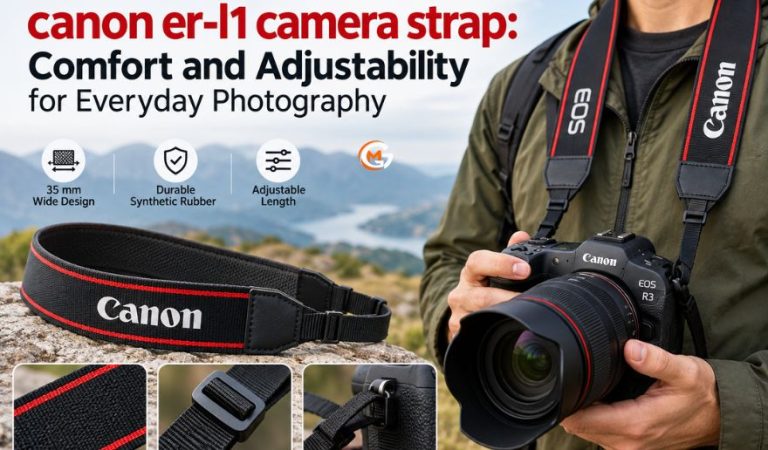
The canon er-l1 camera strap is a wide carrying strap designed for compatible Canon EOS R mirrorless cameras. It attaches to the camera’s strap mounts and provides a convenient way to carry the camera while keeping it accessible for photography.
A camera strap may seem like a small accessory, but a poor fit can make even a short walk uncomfortable or leave expensive equipment swinging against your body. Choosing the right strap can improve everyday handling and make carrying a camera more practical.
This guide explains the ER-L1’s specifications, compatible cameras, comfort, adjustability, attachment process, maintenance, and limitations. It also examines alternative camera straps for photographers with different carrying preferences.
What Is the Canon ER-L1 Camera Strap?
The Canon ER-L1 is a neck and shoulder camera strap sold under manufacturer part number 4898C001. It is closely associated with the Canon EOS R3 and is also listed as compatible with several other EOS R-series cameras.
Unlike a dedicated hand grip, the ER-L1 attaches to the camera’s existing strap mounts. Photographers can wear it around their neck or over a shoulder, while its wider section can also be wrapped around the hand or wrist for additional support.
Its primary purpose is to help photographers carry their cameras while keeping them accessible. A properly attached strap provides an additional connection to the camera when walking, adjusting shooting positions, or preparing for the next photograph.
The ER-L1 follows a conventional camera strap design rather than introducing a specialized mechanical carrying system.
Main Features and Specifications of the ER-L1 Strap
The ER-L1 combines a wide carrying section, adjustable length, and a straightforward attachment arrangement. Its main characteristics are particularly relevant to photographers considering comfort during routine camera use.
Wide 35 mm Strap Design
Canon specifies a strap width of 35 mm, approximately 1.4 inches.
The broader carrying section may help distribute pressure over a larger contact area than a narrow strap. However, actual comfort depends on camera weight, carrying position, clothing, and individual preferences.
Synthetic Rubber Construction
Canon describes the ER-L1 as being made from durable synthetic rubber.
Its predominantly black appearance includes red detailing and Canon and EOS branding. This design gives the accessory a recognizable appearance that matches the styling of Canon’s professional camera equipment.
Length and Adjustment
Canon lists the strap length as 680 mm, while retailer specifications confirm that the ER-L1 has an adjustable design.
Photographers can change the strap’s effective carrying position using its adjustment hardware. The published length should not be confused with a guaranteed neck-to-camera hanging distance, which depends on how the strap is adjusted and worn.
The ER-L1 uses a conventional attachment arrangement rather than an integrated quick-release system.
Which Canon Cameras Are Compatible With the ER-L1?
The Canon ER-L1 was developed for the EOS R camera family, with particularly clear documentation for the EOS R3.
Canon’s regional product listings identify these compatible cameras:
-
Canon EOS R3
-
Canon EOS R5
-
Canon EOS R6
-
Canon EOS R
-
Canon EOS Ra
-
Canon EOS RP
Canon also maintains camera-specific accessory information, which identifies the ER-L1 with the EOS R3. Photographers should consult the compatibility guidance for their exact camera model rather than assuming that every EOS R body is supported.
The physical attachment system is another important consideration. Check that the strap ends fit the camera’s mounting points and that the manufacturer’s instructions describe a suitable threading method.
A camera having an RF lens mount does not automatically establish compatibility with every accessory sold for the EOS R family.
How Comfortable Is the ER-L1 for Everyday Photography?
Comfort is an important consideration when selecting a camera strap, especially for photographers who regularly carry equipment outdoors.
The ER-L1’s wide construction provides a practical starting point, although its specifications alone cannot establish how comfortable it will feel during extended use.
How Strap Width Affects Pressure Distribution
The 35 mm carrying section is one of the ER-L1’s most noticeable comfort-related characteristics.
When the material lies flat, a broader surface can distribute pressure across a larger area. This may reduce the concentrated pressure sometimes associated with narrow carrying straps.
However, the benefit depends on the camera’s weight and how the strap rests against the body. Twisting, uneven loading, and heavy lenses can still cause discomfort.
Hand and Wrist Support During Photography
Canon describes the ER-L1 as suitable for wrapping around the hand or wrist to provide additional support while shooting.
This arrangement may help photographers manage the camera during brief handheld sessions.
However, wrapping a conventional strap around the wrist is not equivalent to using a dedicated wrist restraint. Photographers should maintain a firm grip and avoid wrapping the material so tightly that it restricts movement.
Comfort During Longer Photography Sessions
For casual photography, short walks, and occasional portraits, a traditional camera strap may provide sufficient support.
During longer sessions, the combined weight of the camera and lens becomes increasingly important.
A compact camera with a small lens may feel manageable, while a heavy telephoto setup can place considerably more pressure on the shoulder or neck.
Changing carrying positions and taking occasional breaks can help reduce prolonged strain.
Mast Read: quad equalizer Settings: How to Adjust Sound for Different Music Styles
How to Adjust the Strap for a Better Fit
A properly adjusted strap should keep the camera accessible without allowing excessive movement.
The most suitable length depends on the photographer’s height, preferred carrying position, clothing, and equipment.
Choose a Comfortable Carrying Height
Begin by supporting the camera securely and adjusting the strap until the body rests at a practical height.
If the camera hangs too low, it may swing against nearby objects while walking. If positioned too high, the strap may create tension when bringing the viewfinder to your eye.
The ideal position allows the camera to move naturally between carrying and shooting.
Test the adjustment while wearing the clothing and camera equipment you normally use.
Keep Both Sides Secure
Make small adjustments using the strap’s existing hardware.
Ensure sufficient material remains threaded through the retaining buckles. The strap ends must not be left loosely positioned where they could slide under pressure.
Before walking outdoors, lift and lower the camera several times while standing above a padded surface.
If the strap catches on clothing, restricts arm movement, or presses uncomfortably against your neck, adjust the fit again.
How to Attach the Canon ER-L1 Camera Strap
Correct installation is essential because the attachment points support the camera while it is being carried.
Canon provides camera-specific illustrations showing the appropriate threading arrangement.
Preparing the Camera and Strap
Place the camera on a stable surface and locate the strap mounts on either side of the body.
Inspect the ER-L1’s attachment ends and buckles for visible damage before installation.
Keep the strap untwisted and refer to the camera’s instructions to confirm the correct orientation.
Connecting the Strap to the Camera
For the EOS R3, Canon’s instructions describe passing the strap end through the camera’s strap mount from below and then through the retaining buckle.
After threading, pull the strap to remove excess slack and confirm that the buckle holds the material securely.
Repeat the process on the opposite side while keeping the strap flat.
The exact threading path matters. Incorrect installation can allow an attachment end to move or slip when the camera’s weight is applied.
Checking the Attachment
Before carrying the camera, support it with one hand and gently pull each strap connection.
Watch for movement around the buckles or signs that either end is slipping.
Perform the initial carrying test over a soft surface at a low height.
If the connection appears insecure, repeat the installation according to the manufacturer’s instructions before using the strap normally.
Using the ER-L1 for Different Types of Photography
The ER-L1’s conventional design makes it relevant to several everyday photography situations.
Its suitability depends less on the type of photograph being taken and more on the equipment’s weight and how frequently the camera must be raised or lowered.
Everyday and Family Photography
A neck or shoulder carrying position can be useful when taking photographs during family activities or short outings.
The camera remains nearby without requiring the photographer to return it to a bag between every picture.
This arrangement can be convenient when moving between locations or alternating between photography and other activities.
Travel and Street Photography
Travel photography often involves walking, changing locations, and photographing unexpected subjects.
A controlled carrying position can help keep the camera accessible during these activities.
However, photographers should avoid allowing the camera to swing freely in crowded environments. Keeping one hand near the body when moving through narrow spaces can help prevent accidental contact with surrounding objects.
Outdoor Photography
Outdoor photography introduces additional considerations, including uneven ground, changing weather, and backpacks.
Check that the strap does not interfere with other equipment or restrict movement.
For extended hikes with heavy lenses, a more supportive sling or harness may be preferable to a conventional neck strap.
Practical Tips for Carrying Your Camera Securely
A properly attached camera strap provides useful support, but good handling habits remain essential.
Keep the camera close enough to control its movement, particularly when walking through crowds or climbing stairs.
When changing lenses, stop and support the camera securely rather than allowing it to rotate freely on the strap.
Pay attention to nearby objects, including door handles, railings, tripod components, and bag fasteners.
If using the strap around your wrist, avoid wrapping it tightly enough to restrict circulation or prevent deliberate release.
In environments involving machinery, moving vehicles, or objects that might snag the strap, consider whether wearing a camera strap creates an additional hazard.
Advantages and Disadvantages of the ER-L1 Strap
The Canon ER-L1 offers several practical benefits, although its conventional construction also creates limitations.
Practical Advantages
Its main strengths include a broad carrying section, adjustable length, and a familiar camera attachment system.
The design does not require electronic components, special software, or a complicated operating mechanism.
Photographers can also use its wide portion around the hand or wrist when appropriate.
Its Canon branding may appeal to users who prefer accessories that visually match their camera equipment.
Potential Disadvantages
The ER-L1 does not have an integrated quick-release connector, making removal less convenient than with some modular camera straps.
It also lacks a dedicated padded shoulder platform.
Although its width may help distribute pressure, it does not guarantee comfort for every photographer or every camera configuration.
Users who frequently change cameras or carrying arrangements may prefer a more specialized design.
Limitations to Consider Before Choosing the ER-L1
The ER-L1 should be evaluated alongside the camera and lens combination it will support.
A relatively lightweight mirrorless camera with a compact lens may be easier to carry than the same body fitted with a large telephoto lens.
The strap also cannot prevent a camera from striking nearby objects or automatically stabilize equipment during movement.
Photographers requiring rapid camera changes, dedicated hand support, or a specialized crossbody arrangement should consider alternatives designed for those purposes.
Availability is another consideration. Canon’s regional stores do not always show the same purchasing status; for example, the U.S. product page displays a discontinued notice while the UK store lists the accessory for sale. Confirm local availability and the manufacturer’s part number before ordering.
Cleaning and Maintaining the ER-L1 Camera Strap
Regular inspection and basic cleaning help keep a camera strap in usable condition.
The ER-L1’s synthetic material should be handled carefully, particularly around the attachment ends and adjustment hardware.
Routine Cleaning and Drying
After dusty outings, remove loose dirt with a soft, dry cloth.
For minor surface marks, a slightly damp cloth is a cautious cleaning option. Avoid soaking the strap, aggressive scrubbing, or strong chemical cleaners unless the manufacturer provides specific instructions.
Allow the material to dry naturally before storing it inside a closed camera bag.
Sweat, sunscreen, sand, and salt residue may collect around edges and buckles. Avoid exposing the strap to unnecessary direct heat during drying.
Inspecting the Strap for Damage
Check the attachment ends, retaining buckles, and folded sections regularly.
Look for fraying, tears, cracks, damaged hardware, or areas where the material has become unusually stiff.
If the strap begins slipping through its buckles or shows significant structural damage, stop using it until the problem is resolved or the strap is replaced.
Common ER-L1 Strap Problems and Practical Solutions
Most everyday strap problems involve adjustment, positioning, or attachment rather than complicated mechanical faults.
Strap Feels Too Loose or Too Tight
An uncomfortable fit may result from an unsuitable carrying height or changes in clothing.
Support the camera while making small length adjustments, then test the fit using your usual lens.
Strap Twists or Slips From the Shoulder
A twisted strap may result from incorrect installation or repeated repositioning.
Lay the material flat and inspect the direction of both attachment ends. Rethread the strap if necessary.
If it repeatedly slides from your shoulder, consider another carrying position or strap design.
Attachment Points Appear Loose
Stop carrying the camera by the strap if an attachment begins slipping.
Compare the threading arrangement with the camera’s instructions and inspect the buckle for damage.
Do not rely on glue, tape, or improvised knots to repair a load-bearing camera connection.
Alternatives to the Canon ER-L1 Camera Strap
Photographers have several alternative carrying arrangements, each serving a slightly different purpose.
Standard Canon Neck Straps
A conventional Canon strap supplied with a compatible EOS camera may already provide sufficient support for routine photography.
Before purchasing the ER-L1, compare the existing strap’s width, material, condition, and adjustment range.
Replacing a functional strap solely for appearance may offer little practical improvement.
Peak Design Slide Lite
The Peak Design Slide Lite is designed for neck, shoulder, and sling carrying.
It uses an Anchor Link connection system that allows faster attachment and removal than conventional threaded strap ends.
This option may appeal to photographers who frequently switch between handheld shooting, tripod use, and carrying equipment in a bag.
Peak Design Cuff
The Peak Design Cuff is a dedicated wrist strap with an adjustable loop and removable Anchor Link connection.
Unlike the ER-L1, it is intended specifically for securing a camera near the photographer’s hand.
It may be more appropriate for brief handheld sessions, although it does not provide a neck or shoulder carrying position.
BLACKRAPID Sport-X
The BLACKRAPID Sport-X is a crossbody camera sling featuring a shoulder pad and an underarm stabilizer.
It positions the camera near the hip for access while moving.
Because it uses a different attachment arrangement, photographers must check connector compatibility and follow the manufacturer’s instructions, including any safety-tether requirements.
Final Thoughts
The canon er-l1 camera strap offers a straightforward carrying solution for photographers who prefer a traditional neck or shoulder strap with a wider supporting section. Its 35 mm width, adjustable design, and ability to provide additional hand or wrist support make it relevant to everyday photography.
However, comfort depends on the camera’s weight, the photographer’s carrying preferences, and how the strap is adjusted. Before choosing the ER-L1, confirm camera compatibility and inspect its attachment arrangement. If you require faster removal, a dedicated wrist loop, or additional support during longer sessions, a specialized alternative may be more suitable.
FAQs
What is the canon er-l1 camera strap used for?
The Canon ER-L1 is used to carry compatible cameras around the neck or over a shoulder. Its wide section can also be wrapped around the hand or wrist for additional support during photography.
Which Canon EOS cameras are compatible with the ER-L1 strap?
Canon regional product listings identify the EOS R3, R5, R6, R, Ra, and RP. However, camera-specific compatibility guidance may differ, so checking the exact model before purchasing is recommended.
Is the Canon ER-L1 camera strap adjustable?
Yes. Retailer specifications identify the ER-L1 as adjustable. Photographers can change its carrying position using the strap hardware, provided both attachment ends remain securely threaded through the retaining buckles.
How wide is the Canon ER-L1 camera strap?
The Canon ER-L1 has a stated width of 35 mm, approximately 1.4 inches. Its broad construction may help distribute pressure, but comfort also depends on camera weight and carrying position.
Can you use the Canon ER-L1 strap around your wrist?
Yes. Canon describes wrapping the wide section around the hand or wrist for support. However, the ER-L1 remains a conventional camera strap rather than a dedicated self-tightening wrist restraint.
Is the Canon ER-L1 comfortable for long photography sessions?
Comfort depends on the camera-and-lens combination, carrying position, and individual preferences. Although its width may help spread pressure, published specifications do not establish a guaranteed comfortable carrying duration.
How do you attach the ER-L1 strap securely to a camera?
Thread the strap ends through the camera’s attachment mounts and retaining buckles according to the camera manual. Pull gently to confirm the connections are secure before carrying the camera.
How do you clean and maintain the Canon ER-L1 camera strap?
Remove surface dirt using a soft cloth and minimal moisture when necessary. Allow the strap to dry naturally and regularly inspect its attachment ends, buckles, and material for damage or slipping.
For More News and Daily Updates Visit: Gigly Magazine
