

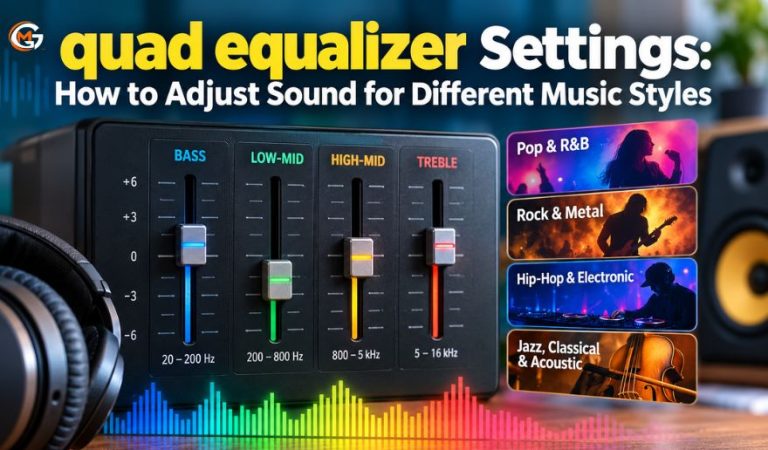
A quad equalizer can help you adjust the balance of bass, midrange, and treble so music sounds more comfortable and detailed. For this guide, the term means a four-band audio equalizer, with separate controls for four areas of the frequency spectrum.
Different music styles place different demands on a sound system. A deep electronic bass line, a busy rock chorus, and an acoustic guitar recording may reveal different problems in the same headphones or speakers.
The goal is to understand the controls, make sensible adjustments, recognize EQ limits, and save useful profiles.
What Is a quad equalizer and How Does It Work?
An equalizer, or EQ, changes the relative level of selected sound frequencies. A four-band model typically divides its controls into low, low-mid, high-mid, and high sections. Raising one band emphasizes part of the sound; lowering it makes that part less prominent.
The bands overlap, and their adjustment ranges depend on the equipment. A fixed-band equalizer may offer only four gain sliders, while a parametric model can let you choose the frequency and width of an adjustment.
“Quad” can also describe four audio channels, or even a non-audio electronic signal equalizer. Check the device specifications before assuming it has four tone controls.
Understanding the Four Frequency Bands
These ranges are listening landmarks, not universal boundaries. Instruments span several bands, so one adjustment may affect several sounds.
Low Frequencies: Bass, Depth, and Impact
Roughly 20–200 Hz contains much of the deep bass, kick-drum weight, and low notes of bass instruments. A gentle boost can add fullness to capable speakers. Too much may create rumble, boom, or distortion, especially on small drivers.
Low-Mid Frequencies: Warmth and Muddiness
Around 150–800 Hz contributes warmth and body to voices, guitars, piano, and drums. If several instruments sound crowded or cloudy, a modest cut somewhere in this region may help. Excessive cutting makes recordings sound hollow.
High-Mid Frequencies: Presence and Definition
Approximately 1–5 kHz carries much of the articulation and attack that helps vocals, guitars, and percussion stand out. Small changes are noticeable here. Excessive boosts can make listening tiring or bring forward harsh notes.
High Frequencies: Brightness and Air
The upper spectrum, particularly about 6–16 kHz, influences cymbal shimmer, consonant sharpness, and a sense of air. A high-frequency shelf may brighten dull playback or tame piercing treble. Hearing and equipment response vary substantially at these frequencies.
Key Equalizer Controls and Their Functions
Gain: How Much You Boost or Cut
Gain is usually expressed in decibels (dB). A positive value boosts the selected range; a negative value reduces it. For casual listening, changes of roughly 1–3 dB are useful experiments, not recommended limits or guaranteed improvements.
Frequency: Where an Adjustment Acts
Fixed-frequency sliders cannot move their target points. A sweepable or parametric EQ lets you select a center frequency, such as 250 Hz for lower-mid warmth or 3 kHz for presence. Look at your own device labels rather than copying numbers from another model.
Q, Bandwidth, and Filter Shape
Q determines how broad or narrow a bell-shaped adjustment is: higher Q generally means a narrower change. Shelving filters instead affect a region above or below a selected point. Some four-band EQs provide Q only for their middle bands, so the absence of that knob is normal.
What You Need Before Adjusting Your Equalizer
You need an audio source, working speakers or headphones, and an equalizer in the playback device, app, amplifier, mixer, or operating system. There is no special account or subscription inherently required to use four-band EQ; access depends on the particular software or hardware.
Choose two or three familiar, well-recorded tracks with different arrangements. Sit in your usual listening position, set a comfortable volume, and disable extra bass enhancement or competing EQ effects temporarily. This makes changes easier to judge.
Check whether your controls affect the whole device or only a particular music app. Check whether settings follow your headphones or stay inside an app.
Mast Read: thejavasea.me leaks aio-tlp371: What Is Verified and What Remains Unclear
How to Set Up a Balanced quad equalizer Profile
Start from a neutral baseline instead of selecting the most dramatic-looking curve. If your player provides a bypass switch, use it to compare your changes against the original recording.
-
Reset the EQ. Put adjustable gains at 0 dB, or choose Flat. Keep the other sound-processing features off during setup.
-
Play a familiar section. Use a chorus or passage containing vocals, bass, and percussion. Keep the playback volume comfortable.
-
Name one problem. Decide whether the track sounds boomy, dull, harsh, thin, or unclear before touching a control.
-
Adjust one band. Try a 1–2 dB cut in a troublesome region. If something genuinely feels missing, try a similarly small boost instead.
-
Compare fairly. Toggle EQ off and on at similar perceived loudness. A louder version can seem better even when its tonal balance is worse.
-
Check headroom. If boosting creates harsh digital distortion, lower the EQ preamp or overall signal level and retest. Turning down headphone volume afterward may not remove upstream clipping.
-
Test and save. Repeat with other songs. Save a profile only if the improvement remains useful beyond one short passage.
These steps suit fixed and parametric controls. Begin with broad changes before narrow corrections, and stop when the sound is satisfying.
Equalizer Settings for Pop and R&B Music
Pop and R&B often combine prominent vocals with layered bass, keyboards, and bright percussion. Begin flat and listen for whether the bass overwhelms the singer or the upper range sounds brittle. A small low-mid reduction, perhaps 1–2 dB in the appropriate area, can sometimes separate the vocal from a thick accompaniment.
For a playback system that sounds lean, experiment with a gentle low-shelf increase instead. If vocals still feel distant, a restrained high-mid lift may help, but first check whether excess bass is masking them. Avoid boosting both ends automatically: many pop tracks already have a carefully shaped, full-frequency balance.
Use at least one quieter verse and one busy chorus when testing. A setting that flatters a verse may crowd the chorus.
Equalizer Settings for Rock and Metal Music
Dense guitars, powerful drums, and forceful vocals share a large portion of the midrange. Cutting too much midrange can make rock sound impressive briefly but reduce the character of guitars and snare drums.
If distorted guitars sound boxy, try a gentle cut in the lower-mid region rather than lifting every other band. If a vocal is buried, consider a small presence adjustment around the upper mids, where your EQ permits it. If cymbals or guitar edges become piercing, reduce the relevant high-mid or treble band by about 1–2 dB.
Test the busiest passage as well as the intro. Stronger EQ cannot undo heavy mastering compression or restore missing dynamics.
Equalizer Settings for Hip-Hop and Electronic Music
Hip-hop, dance, and electronic tracks often rely on the relationship between kick drum, bass, and synthesizers. If your speakers reproduce deep bass cleanly, a subtle low-band boost may provide extra impact. Begin around 1–2 dB and listen for a loss of clarity in the kick or vocal.
If the bass is already heavy, cutting a little low-end or low-mid energy can improve definition more effectively than adding treble. Increasing sub-bass on tiny phone speakers rarely creates the missing deep notes; it may simply waste headroom or produce distortion.
Bright hi-hats and electronic leads also deserve attention. If they become sharp at normal listening levels, try a restrained high-frequency cut rather than lowering the entire song’s volume to compensate.
Equalizer Settings for Jazz, Classical, and Acoustic Music
These recordings often reward a lighter touch because instrumental tone, ambience, and small dynamic changes carry much of the listening experience. Start with all four bands flat and decide whether a specific deficiency actually needs fixing.
For jazz, avoid letting double bass or kick drum dominate piano, horns, and vocals. A slight low-mid cut may clear a boomy playback system, while a gentle treble reduction can smooth overly sharp cymbals. Acoustic guitar can turn thin when lower mids are reduced excessively.
Classical music may shift from a quiet solo instrument to a full orchestra. Test both sections before saving a curve. EQ cannot repair speaker placement or restore missing ambience; overcorrection can change the intended balance.
Adjusting EQ for Headphones, Speakers, and Rooms
The same numerical EQ settings can sound different on two pairs of headphones. Their drivers, ear-pad seal, fit, and existing frequency responses influence what reaches your ears. A bass boost that helps one pair may overwhelm another, particularly if noise cancellation or a manufacturer sound mode is active.
Speakers add the room to the equation. Moving a speaker closer to a wall, changing your seat, or placing speakers on a resonant surface can alter perceived bass. Before cutting a large amount of low frequency, check positioning and avoid judging sound from a single spot.
In cars, road noise and cabin acoustics change what you hear, so tune at a safe, stationary moment. Save separate profiles for headphones, home speakers, and car audio where the device allows it. Keep listening volume moderate; EQ is not a substitute for responsible volume control.
Saving and Refining Music EQ Presets
Name each profile descriptively, such as “Home Speakers—Balanced” or “Headphones—Softer Treble.” Such labels often beat generic genre names.
If possible, duplicate a working preset before major changes. Compare it with Flat while listening at similar levels, and revisit it after switching headphones, changing speaker placement, or enabling another sound mode. A preset is a convenient starting point, not a permanent rule for every album.
Common quad equalizer Problems and How to Fix Them
Bass Sounds Muddy or Distorted
Excessive low-band gain or room reinforcement may be responsible. Return the bass control toward zero, check speaker placement, and reduce preamp gain if distortion remains after EQ boosts. Small speakers may simply be unable to reproduce very low notes clearly.
Vocals Sound Distant or Thin
First check whether strong bass is masking the voice. If so, reduce the low or low-mid band slightly. If the voice lacks body instead, undo aggressive midrange cuts; a bigger high-mid boost can make thinness worse.
Treble Sounds Harsh or Fatiguing
Try reducing the high or high-mid setting by 1–2 dB, depending on where the sharpness occurs. Check whether an additional brightness feature is active. Harshness already present in the recording may not disappear without also dulling useful detail.
Adjustments Do Nothing or Cause Clipping
Confirm that the EQ is enabled and applies to the active output. Some app equalizers work only inside that app. If sound breaks up after boosting, reduce signal gain before the clipping stage, lower excessive boosts, and check for other processing in the playback chain.
Advantages, Limitations, and Other Equalizer Options
A four-band EQ is quick to learn and offers more tonal control than simple bass and treble knobs. Its main limitation is resolution: with only four adjustable regions, solving a narrow resonance may affect neighboring sounds. Fixed-band models also cannot target an arbitrary frequency.
Graphic Equalizers in Music Players
Multi-band graphic EQs provide more sliders at predetermined frequencies. Apple Music on Mac and Windows, for example, includes an adjustable equalizer and saved presets. This approach suits listeners who want more tonal shaping without learning parametric controls, although it remains limited to the playback paths the software supports.
Parametric EQ Software
A full parametric equalizer offers movable frequency points, gain, and bandwidth controls. FabFilter Pro-Q 4 is a professional paid plug-in for compatible audio production software. It provides far more flexibility than a simple four-band panel but requires more setup and care.
Four-Band Headphone EQ and Room Correction
ShurePlus PLAY provides a four-band EQ for supported Shure headphones and in-app playback, with different persistence depending on the device. For persistent room-related speaker problems, careful placement or measured room correction may be more useful than saving increasingly extreme genre presets.
Final Thoughts
Useful EQ settings begin with listening, not copying a dramatic curve. Start flat, identify a specific problem, and make modest changes while comparing against the original at similar loudness.
A quad equalizer is flexible enough for everyday music playback, but its results depend on the recording, equipment, room, and personal preference. Keep the settings that help across several tracks and leave the rest alone.
FAQs
What is the difference between a quad equalizer and a regular equalizer?
A four-band quad equalizer has four adjustable frequency sections. Other equalizers may have fewer or more bands, or provide more precise controls. The term “quad” can also mean four channels, so product specifications matter.
What are good starting settings for a four-band equalizer?
Set all four gain controls to 0 dB first. Then make small cuts or boosts only where you hear a problem. There is no universal four-number preset that suits every recording and speaker system.
Should I boost bass and treble for every music genre?
No. Some recordings and headphones already emphasize those ranges. Boosting both ends can bury vocals, exaggerate cymbals, or create clipping, so compare the result with a flat setting before saving it.
Which frequency range makes vocals sound clearer?
Vocal intelligibility often benefits from the presence region, broadly around 1–5 kHz. However, reducing excessive bass or low mids may reveal the voice more naturally than raising high mids. The recording determines which approach works.
Can a quad equalizer improve sound quality on headphones?
It can improve perceived tonal balance when headphones sound too bass-heavy, thin, or bright. Results depend on the headphone response and fit. EQ cannot fully correct damaged drivers, poor sealing, or distortion caused by playback limits.
Is it better to cut or boost frequencies when adjusting EQ?
Neither is always better. Cutting is often useful when one region dominates, while modest boosting can help when something genuinely sounds lacking. Check the loudness comparison and digital headroom, especially after increasing gain.
Why do the same equalizer settings sound different on different speakers?
Speakers have different frequency responses and bass capabilities. Their placement and the room also change what reaches the listener. As a result, a preset that sounds balanced on one system may need adjustment on another.
Can excessive equalizer adjustments cause distortion?
Yes. Strong boosts can overload digital processing stages or push speakers beyond their comfortable range. Reduce the boosts, allow enough preamp headroom, and test at a sensible volume. More EQ does not guarantee better sound.
For More News and Daily Updates Visit: Gigly Magazine
