

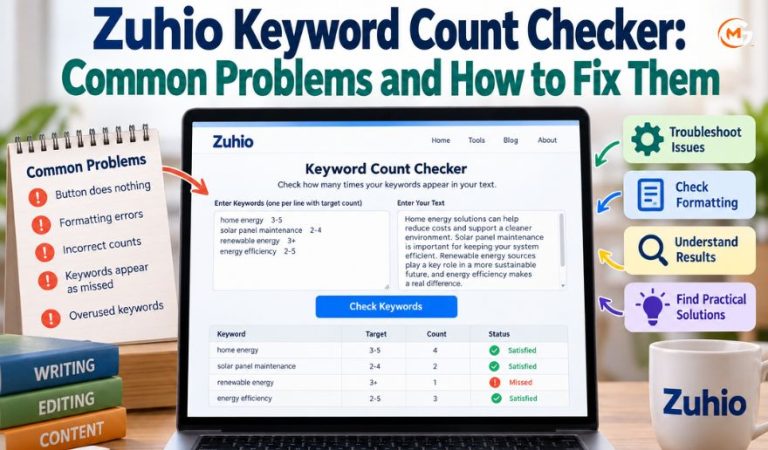
Zuhio provides a web-based checker that counts how often selected words or phrases appear in a piece of writing. Rather than making readers count repeated terms manually, the tool offers a quicker way to compare a draft with writing requirements.
Problems arise when the checker does not respond, a supplied phrase appears to be missing, or the reported totals look unexpected.
This guide explains the checking process, the input format described in recent reviews, practical fixes, and alternative tools. It also shows where automatic counting stops being useful and editorial judgment needs to take over.
What Is Zuhio and What Does Its Checker Do?
Zuhio describes itself as a platform for small productivity tools. Its writing checker is available on the main website and focuses on measuring the frequency of terms within text supplied by the visitor.
The distinction matters because a numerical check cannot assess the quality or accuracy of the writing. It confirms appearances of selected text, not the usefulness of the surrounding explanation.
For example, an editor might request that “home energy savings” appear at least three times in an article. A count can reveal whether the draft meets that instruction.
How the Counting Process Works
A basic text counter searches the material you provide for a specified sequence of characters. Every detected occurrence increases the total.
Zuhio’s public description emphasizes checking individual terms and multiword expressions. Recent hands-on accounts describe a more specific workflow in which users paste several entries, each paired with a desired number of mentions, then supply the complete draft in a second field.
Under that reported workflow, the results separate entries that meet the minimum from those that fall short.
Different articles describe different versions of the interface, so some reported features may not match the current display. Start with the controls you can actually see.
Main Features and Practical Uses
Counting Single Words and Longer Phrases
The site presents counting as its primary function and explicitly mentions support for phrases containing several words. This is helpful when a brief specifies “solar panel maintenance” rather than the broader idea of home energy.
Checking Several Targets Together
Independent walkthroughs describe an input box intended for a list of target expressions, rather than repeated checks of one expression at a time. It depends on supplying the list in an accepted format. A copied column of phrases alone may not work where the tool expects an additional column of numbers.
Comparing Results With Mention Targets
In the reported two-field version, each entry carries a minimum or range. Results distinguish entries below the minimum from those that have reached it. That distinction helps editors prioritize missing material, although the maximum still requires careful attention.
Supporting a Final Editorial Review
The checker fits naturally near the end of drafting. Writers can review coverage, make necessary changes, and check again. A second pass after revisions is especially helpful if entire paragraphs have been moved or rewritten.
What You Need Before Starting
The tool is presented as a browser-based utility. The main page can be viewed without installing desktop software, and recent reviewers report using the checker without creating an account or paying a fee.
Prepare a complete copy of the text you want examined. Include headings, questions, captions, or other material only if those parts should contribute to the totals.
If your assignment includes target expressions and mention ranges, keep that list separate from the article.
A current browser with scripts enabled is a reasonable starting point. There is no verified need for a dedicated mobile app, browser extension, or special operating system.
Mast Read: troozer.com Features: Understanding Its Content, Navigation, and Reader Experience
How to Use Zuhio Step by Step
Recent detailed reviews describe two main text fields: one for the target list and another for the article. These steps apply when that arrangement is shown.
-
Open the Zuhio website and locate the writing checker on its main page.
-
Prepare each target expression beside its required mention count or range. A spreadsheet with one column for expressions and another for targets can preserve the needed separator when copied.
-
Paste the formatted entries into the first field. Enter one entry per line, using a Tab between the expression and its target.
-
Paste the article into the second field, checking that no paragraphs or headings were accidentally omitted.
-
Press the checking button and inspect the results shown beneath the fields. If nothing appears, test the format before assuming the service is unavailable.
For a simple example, enter “garden lighting” with a target of two to four mentions. If your draft includes that exact expression only once, it should be treated as below the requested minimum in the reported version of the tool.
Keep the original document open. The checker is a review aid, not a substitute for saving or editing your working copy.
How to Read Counts and Target Ranges
The most useful number is the actual number of matches found. Compare that value with the minimum stated in your brief.
In reported results, the categories labeled “Satisfied” and “Missed” refer primarily to whether an entry reaches its minimum. A satisfied result therefore does not automatically mean the writing is balanced or that a stated maximum was respected.
Consider a requirement of three to six mentions. An article with ten occurrences could exceed the upper boundary even if it appears among satisfied entries.
Do not confuse raw counts with percentages. Some online descriptions claim that Zuhio displays density percentages and total word counts, while detailed reviews of the two-field interface report neither.
Problem One: The Checking Button Does Nothing
Check That Both Fields Contain Valid Text
A button that appears unresponsive is frustrating because it offers no clue about the cause. Recent reviewers describe cases in which malformed target lists produced no visible result or error message.
First, confirm that the draft field contains ordinary selectable text. Then check that the target field contains a complete entry with a valid count or range, not merely a phrase on its own.
Test With One Small Example
Replace the inputs temporarily with a short sample paragraph and a single target that appears in it. Use a spreadsheet to create the required two-column entry if the interface expects tab-separated data. A successful small test suggests that the earlier failure was connected to the original content or formatting.
If the small example also produces nothing, refresh the page and repeat once. Try a different browser only after checking the input rules.
Know When to Stop Troubleshooting
If correctly structured sample content still produces no result in more than one current browser, the problem may lie with the page or its scripts. Keep your draft safe in its original file and use another counting method.
Check Browser and Page Loading Issues
If the page itself fails to load, verify your connection and try another current browser. Extensions can interfere with scripts, so a private window may help identify a local conflict. An unresponsive button and an unavailable page are different issues; neither proves the entire service is permanently down.
Problem Two: The Target List Is Rejected
Missing Tab Separators
A detailed independent test reported that the list requires a Tab character between each expression and its target. Several spaces may look identical on screen but are not the same character.
An effective workaround is to prepare the information in two adjacent spreadsheet columns, select the relevant cells, and copy them together. Spreadsheet copying typically preserves a Tab between column values.
Invalid Ranges or Incomplete Lines
Reported examples include a closed range such as 2-5 and an open minimum such as 3+. Enter ordinary numerals, avoid unnecessary commentary after the values, and do not leave blank targets. A stray label or a row with only a phrase may interfere with processing.
If the tool fails, reduce the list to one entry, then add rows gradually. This isolates the troublesome line without forcing you to rewrite the entire document.
Hidden Characters From Other Programs
Copying from formatted documents can bring extra line breaks, nonbreaking spaces, or unusual dashes. Pasting through a plain-text editor or rebuilding a small list in a spreadsheet may help identify the issue.
Problem Three: The Reported Counts Look Wrong
Partial Matches Inside Longer Words
One independent hands-on review reported that shorter entries can match character sequences inside longer words. Under that behavior, searching for “art” could also detect the same letters within “starting.”
Use more specific expressions when possible, and manually inspect unusually high results.
Capital Letters, Punctuation, and Symbols
That same review found case-insensitive matching in its tests, so differently capitalized versions of an expression contributed to one total. Unusual symbols, however, can be difficult for simple pattern-matching systems. Technical names containing plus signs or brackets deserve extra checking.
Punctuation also changes how expressions appear in pasted text. A hyphen, an apostrophe, or an unexpected line break may create a difference between the entry and the sentence being checked.
Differences in the Text You Pasted
A counter analyzes the material in its input field, not the article you intended to paste. If a heading was included in one check but removed in another, totals may change. The same applies to repeated captions, footers, draft notes, or questions.
For reliable comparisons, use the same complete document version each time. Check the pasted beginning and ending before interpreting any unexpected number.
Problem Four: Required Phrases Are Missed or Overused
When an expected phrase appears among missed entries, check its exact spelling and word order. A plural ending, inserted adjective, or swapped word may change what is detected.
Then compare the result with the minimum target. If a phrase appears twice but the brief requires four mentions, the classification may be correct. The remedy is not necessarily to insert it twice wherever space is available; first consider whether additional uses would sound natural.
Overuse requires the opposite judgment. A reviewer reported that the checker may mark an entry satisfied even when its count exceeds the stated maximum. Read the actual total, inspect nearby sentences, and remove repetition that makes the article awkward.
Mention targets are editorial requirements, not universal rules about good writing. A phrase included once in a well-explained section may serve readers better than an awkward phrase repeated four times.
Advantages, Limitations, and Privacy Considerations
Advantages
For a focused task, Zuhio offers a simple workflow: supply expressions, supply text, and review matches. The reported ability to check a list against minimum targets can be useful for editors working from structured briefs.
Limitations
The tool cannot decide whether a repeated phrase improves a paragraph. It should not be relied upon to check factual accuracy, originality, clarity, or whether a finished page meets readers’ needs. It also should not be confused with a tool that compares your draft with other published content.
Privacy Before Pasting a Draft
Zuhio publishes a privacy policy describing website analytics, cookies, and possible collection of information supplied through its services. The policy does not clearly establish what happens to every draft entered into the checker.
Avoid pasting confidential client material, unpublished contracts, personal records, or other restricted text unless you are authorized to do so and satisfied with the handling of the content. For sensitive work, a local document search is the safer practical choice.
Alternatives When Zuhio Does Not Meet Your Needs
Find in Microsoft Word or Google Docs
The search function in a document editor is a practical fallback for locating specific words and phrases. It works directly in the draft, so you do not need to paste unpublished material into a separate checking site.
WordCounter for Repetition and Writing Statistics
WordCounter is a browser-based editor offering free word and character counts, frequently used terms, and related writing statistics. Its frequency view is helpful for finding repetition, although it serves a broader editing purpose and does not reproduce Zuhio’s reported target-range workflow.
FreeToolBank for Detailed Matching
FreeToolBank provides a free online counter with controls for whole-word versus partial matching, case sensitivity, and viewing matches in context. It states that text processing happens in the browser. This makes it an option when you need to understand why two tools disagree about a count.
Yoast for WordPress Content
Yoast’s WordPress plugin includes phrase-frequency guidance within its content analysis. Its core plugin has a free version, while additional features require payment.
Final Thoughts
Zuhio is most useful as a narrow final-checking aid, particularly when a draft must include specified expressions a certain number of times.
If a result seems wrong, compare the exact phrase, inspect the full pasted text, and test a small example before changing browsers.
When the checker lacks needed controls or reliable feedback, use a document search or a more transparent alternative and continue working without compromising the quality of the writing.
FAQs
Is Zuhio free to use?
The checker is publicly presented as a web utility, and recent hands-on reviews report using its basic function without payment. No separate price is clearly displayed for that feature. Check any payment request carefully, especially on similarly named websites.
Do I need to create an account?
Recent reviewers report that the checker opens without registration. You should be able to reach the basic fields from the public site, although access requirements could change.
Why does pressing the checking button show nothing?
A malformed target entry is one reported cause, especially when a required separator or mention range is missing. Confirm both fields, try one correctly structured example, and then check your browser if the problem continues.
How should I format multiple entries?
Independent walkthroughs describe one expression per line, with a Tab separating it from a minimum or range. Copying two adjacent spreadsheet columns is an easy way to create this structure without replacing Tabs with ordinary spaces.
Can Zuhio check several phrases at once?
Detailed reports of the two-field interface say yes: users can submit a list and receive results for several expressions together. Each entry may require a corresponding mention target.
Why is a phrase counted more often than expected?
The tool may recognize matching letters inside longer words, or the pasted material may include headings and captions you forgot about. Examine the exact expression and compare its occurrences with your document search results.
Does Zuhio check the content of a live webpage?
The documented workflow focuses on text pasted into fields. A live-page fetching feature has not been established for this checker. Copy only material you are entitled to work with.
What should I use if Zuhio still does not work?
Use Find in your document editor for a quick manual check, or try WordCounter or FreeToolBank for more detailed frequency information. WordPress users can also consider Yoast when editing content inside that platform.
For More News and Daily Updates Visit: Gigly Magazine
